'%20d='M35.1527%2028.5549L35.1527%2069L17.6979%2069L17.6979%2028.5549L-0.162012%2028.5549L-0.162012%2014.6489L52.9354%2014.6489L52.9354%2028.5549L35.1527%2028.5549ZM108.55%2031.313Q108.55%2036.2891%20105.85%2040.3201Q103.169%2044.3511%2098.0385%2046.2412L110.132%2069L90.5358%2069L80.8923%2049.1729L74.4118%2049.1729L74.4118%2069L56.957%2069L56.957%2014.6489L90.2272%2014.6489Q96.0712%2014.6489%20100.218%2016.9055Q104.365%2019.1428%20106.448%2022.981Q108.55%2026.8191%20108.55%2031.313ZM90.7673%2032.0266Q90.7673%2029.8857%2089.34%2028.4778Q87.9321%2027.0505%2085.8684%2027.0505L74.4118%2027.0505L74.4118%2037.0798L85.8684%2037.0798Q87.9321%2037.0798%2089.34%2035.6333Q90.7673%2034.1675%2090.7673%2032.0266ZM150.883%2069L148.607%2061.343L129.551%2061.343L127.276%2069L109.416%2069L129.243%2014.6489L149.552%2014.6489L169.379%2069L150.883%2069ZM133.197%2049.1729L144.962%2049.1729L139.272%2029.8086L138.964%2029.8086L133.197%2049.1729ZM210.844%2069L188.028%2042.6152L188.028%2069L171.981%2069L171.981%2014.6489L187.237%2014.6489L210.054%2041.4194L210.054%2014.6489L226.101%2014.6489L226.101%2069L210.844%2069ZM256.674%2013.7039Q267.108%2013.7039%20273.82%2017.9277Q280.532%2022.1516%20280.686%2030.4451L280.686%2031.3901L264.331%2031.3901L264.331%2031.0815Q264.331%2028.7092%20262.595%2027.1277Q260.859%2025.5461%20257.31%2025.5461Q253.819%2025.5461%20251.968%2026.5876Q250.116%2027.6099%20250.116%2029.1143Q250.116%2031.2358%20252.643%2032.2773Q255.169%2033.2996%20260.782%2034.3989Q267.34%2035.749%20271.564%2037.2148Q275.787%2038.6614%20278.951%2041.9788Q282.114%2045.2961%20282.191%2050.9858Q282.191%2060.6294%20275.672%2065.2969Q269.153%2069.9451%20258.255%2069.9451Q245.526%2069.9451%20238.448%2065.6826Q231.388%2061.4202%20231.388%2050.6001L247.898%2050.6001Q247.898%2054.7083%20250.02%2056.0969Q252.161%2057.4663%20256.674%2057.4663Q259.991%2057.4663%20262.151%2056.7527Q264.331%2056.0391%20264.331%2053.8403Q264.331%2051.8538%20261.92%2050.8701Q259.509%2049.8865%20254.07%2048.7678Q247.435%2047.3599%20243.076%2045.8169Q238.737%2044.2739%20235.497%2040.7251Q232.256%2037.157%20232.256%2031.0815Q232.256%2022.1516%20239.161%2017.9277Q246.085%2013.7039%20256.674%2013.7039ZM312.848%2013.7039Q324.922%2013.7039%20331.942%2019.7407Q338.982%2025.7776%20338.982%2037.0027L322.318%2037.0027Q322.318%2032.2581%20319.83%2029.5Q317.342%2026.7419%20312.751%2026.7419Q307.467%2026.7419%20304.979%2030.0593Q302.491%2033.3767%20302.491%2039.2979L302.491%2044.3511Q302.491%2050.1951%20304.979%2053.551Q307.467%2056.907%20312.597%2056.907Q317.65%2056.907%20320.254%2054.3032Q322.877%2051.6995%20322.877%2046.9548L338.982%2046.9548Q338.982%2058.1028%20332.154%2064.0239Q325.327%2069.9451%20312.848%2069.9451Q298.942%2069.9451%20291.786%2062.8474Q284.631%2055.7305%20284.631%2041.8245Q284.631%2027.9185%20291.786%2020.8208Q298.942%2013.7039%20312.848%2013.7039ZM396.031%2031.313Q396.031%2036.2891%20393.331%2040.3201Q390.65%2044.3511%20385.519%2046.2412L397.612%2069L378.017%2069L368.373%2049.1729L361.893%2049.1729L361.893%2069L344.438%2069L344.438%2014.6489L377.708%2014.6489Q383.552%2014.6489%20387.699%2016.9055Q391.846%2019.1428%20393.929%2022.981Q396.031%2026.8191%20396.031%2031.313ZM378.248%2032.0266Q378.248%2029.8857%20376.821%2028.4778Q375.413%2027.0505%20373.349%2027.0505L361.893%2027.0505L361.893%2037.0798L373.349%2037.0798Q375.413%2037.0798%20376.821%2035.6333Q378.248%2034.1675%20378.248%2032.0266ZM402.741%2069L402.741%2014.6489L420.195%2014.6489L420.195%2069L402.741%2069ZM459.224%2014.6489Q464.277%2014.6489%20468.231%2016.9827Q472.185%2019.3164%20474.383%2023.386Q476.602%2027.4556%20476.602%2032.5088L476.602%2033.531Q476.602%2038.5842%20474.383%2042.6924Q472.185%2046.8005%20468.231%2049.1343Q464.277%2051.468%20459.224%2051.468L446.186%2051.468L446.186%2069L428.731%2069L428.731%2014.6489L459.224%2014.6489ZM446.186%2038.7385L453.38%2038.7385Q456.138%2038.7385%20457.527%2037.3306Q458.915%2035.9033%20458.915%2033.4539L458.915%2032.8174Q458.915%2030.2908%20457.527%2028.9214Q456.138%2027.5327%20453.38%2027.5327L446.186%2027.5327L446.186%2038.7385ZM513.103%2028.5549L513.103%2069L495.648%2069L495.648%2028.5549L477.788%2028.5549L477.788%2014.6489L530.885%2014.6489L530.885%2028.5549L513.103%2028.5549Z'/%3e%3c/svg%3e)

Twitter threads consistently outperform single tweets. They pull more impressions, more engagement, and more follows, because the format keeps people reading instead of scrolling past.
The problem? Writing a good thread takes time. You need a hook, a logical flow, individual tweets that work on their own, and a payoff at the end. Starting from a blank page, that's a 20-30 minute job at minimum.
But if you already have a YouTube video on the topic, you're sitting on a goldmine of structured content. Your video already has the argument, the examples, the flow. You just need to extract it and reformat it.
Why Threads Work So Well
Before we get into the how, it's worth understanding why threads perform:
They keep people on-platform. Twitter's algorithm rewards content that keeps users scrolling. A thread does exactly that, each tweet is a mini-cliffhanger that pulls you to the next one.
They signal effort. A 10-tweet thread looks like you put thought into it. People respect that and are more likely to engage, bookmark, and share.
Each tweet is a potential entry point. When someone retweets tweet #5 of your thread, their followers see it and might click to read the whole thing. Single tweets don't have this multiplier effect.
They build authority. A well-structured thread that teaches something useful positions you as someone worth following. It's the Twitter equivalent of a blog post.
The Anatomy of a Great Thread
Every good thread follows a structure:
Tweet 1: The hook. This is everything. If the first tweet doesn't stop the scroll, nobody reads the rest. Good hooks are: surprising stats, bold claims, relatable problems, or "here's what I learned" setups.
Tweets 2-8: The meat. Each tweet should make one point. Don't try to cram multiple ideas into a single tweet. Use simple language, short sentences. If a point needs context, use two tweets instead of one dense one.
Tweet 9-10: The payoff. Summarize the key insight, give a concrete next step, or share a resource. Don't just trail off, end strong.
Final tweet: The CTA. "Follow me for more on [topic]" or "Bookmark this for later." Threads that ask for engagement get more of it.
Method 1: Manual Extraction
Here's how to do it by hand:
- Get the transcript. Open your YouTube video, click the three dots below it, select "Show transcript." Copy the text. Alternatively, use a transcription tool for cleaner output (here's how to transcribe a YouTube video to text).
- Read through and find the thread. Not everything in a 15-minute video belongs in a thread. Look for one specific argument, framework, or story that would work as a standalone piece. A 10-tweet thread covers roughly 2-3 minutes of video content.
- Outline the tweets. Write one sentence per tweet first. Just the core point. Then expand each into a full tweet under 280 characters.
- Write the hook last. Seriously. Write the whole thread first, then go back and craft the perfect opening tweet. You'll know what to tease once you know the full content.
- Clean up. Remove filler words ("basically," "you know," "so yeah"). Tighten sentences. Make sure each tweet flows into the next.
This method works but takes 15-25 minutes per thread. Fine for one video, painful if you're doing it weekly.
Method 2: AI-Assisted (Copy-Paste to ChatGPT)
Faster approach:
- Get the transcript (same as above)
- Paste it into ChatGPT or Claude with this prompt:
"Turn this transcript into a Twitter thread. 8-12 tweets. Each tweet under 280 characters. Start with a hook that would stop someone from scrolling. End with a CTA to bookmark or follow. No hashtags. Write in a conversational tone." - Review and edit. The AI output will be decent but needs your voice.
This takes about 8-12 minutes including editing.
Method 3: One-Click with a Repurposing Tool
The fastest route:
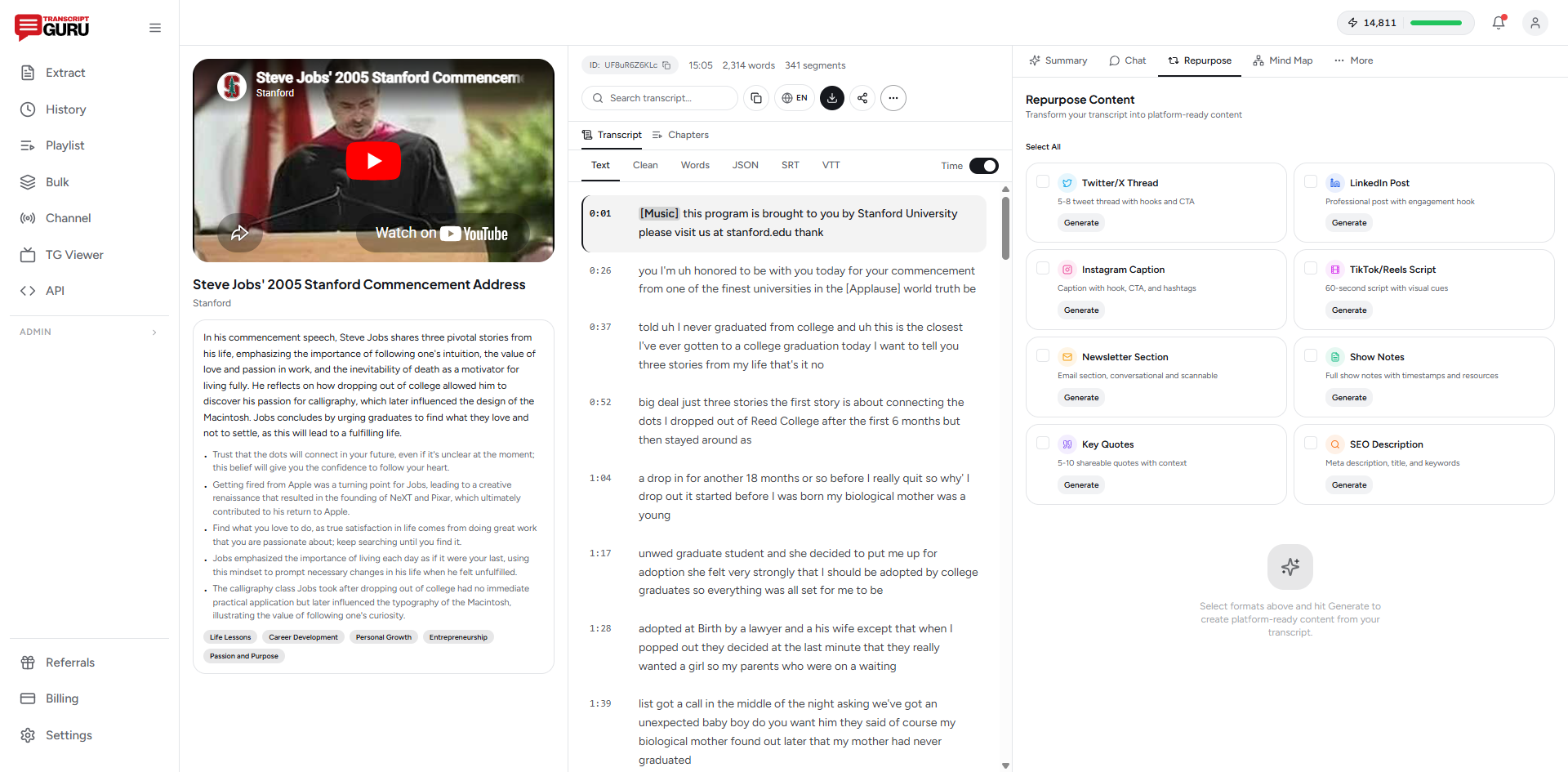
- Paste your YouTube URL into a tool like Transcript Guru.
- Click "Twitter Thread" from the repurposing options.
- Get a ready-to-post thread with a hook, numbered tweets, and a CTA, all generated in about 30 seconds.
- Copy it into Twitter directly or into a scheduling tool like Typefully.
Other tools in this space: Typefully has AI thread generation (though you'd need to paste the transcript yourself), and TweetHunter offers similar repurposing features.
Total time: about 2-5 minutes including review. The 30-second claim in the title refers to the generation step, you should always spend a couple of minutes reviewing and tweaking.
Turn your next video into a thread in seconds
Get Started FreeTips for Better Video-to-Thread Conversions
One thread per video is a floor, not a ceiling. A 20-minute video can easily produce 2-3 different threads, each focusing on a different angle. Don't limit yourself to one.
Don't link the video in tweet #1. External links tend to get less reach. Put the YouTube link in a reply to the thread or in the final tweet.
Use line breaks. Dense tweets get skipped. Break up your text with blank lines. Short paragraphs. One idea per visual block.
Add numbers and lists. "5 things I learned from..." or "Here's a 3-step framework for..." These signal value and are easy to skim.
Don't be afraid to simplify. Your video might have nuanced, detailed explanations. The thread version should be punchier and more direct. You can always reply with "want the deep dive? here's the full video" for people who want more.
Time your posts. Threads tend to perform best during peak hours for your audience. For many English-speaking audiences that's mid-morning or early evening. Use scheduling tools to hit the right window consistently.
What to Realistically Expect
If you're starting from zero, don't expect viral threads immediately. But a few patterns hold up across creators:
- Threads usually pull noticeably more impressions than your average single tweet
- Bookmark rates on threads tend to be higher than on any other format
- Threads are one of the more reliable formats for steady follower growth
- A large share of thread readers make it to the end, often more than finish a video
The compounding effect is real. Consistent weekly threads build a library of content that continues to get discovered through search and reposts.
Start With Your Best Video
Don't start with a random video. Pick your best-performing YouTube video, the one with the most views or engagement. That content already resonated with an audience. It'll likely resonate on Twitter too.
Get the transcript, generate the thread, and post it. See what happens. If it works (and it probably will), make it part of your weekly workflow.
You already did the hard work of creating the video. The thread is just letting more people see the ideas.
Keep reading
- How to Repurpose YouTube Videos Into Social Media Content
- How to Summarize a YouTube Video With AI
- How to Transcribe a YouTube Video to Text
Frequently Asked Questions
How long should a Twitter thread be?
Most high-performing threads run 7 to 12 tweets. That is long enough to deliver real value and signal effort, but short enough that readers reach the payoff. One tight idea per tweet beats cramming.
How many threads can one video produce?
A 20-minute video can usually yield two or three distinct threads, each taking a different angle. Treat one thread per video as a floor, not a ceiling.
Should I put the YouTube link in the first tweet?
No. Posts with external links in the opening tweet tend to get less reach. Put the link in a reply or in the final tweet so the algorithm surfaces the thread to more people first.
Can I generate a thread automatically from a video?
Yes. Paste the URL into a repurposing tool, pull the transcript, and generate a thread with a hook and numbered tweets in seconds. You should still spend a couple of minutes editing it into your own voice before posting.
Ready to try it yourself?
Extract transcripts, generate summaries, and repurpose content, free to start.
Start FreeRelated Articles
How to Repurpose YouTube Videos Into Social Media Content (2026 Guide)
Mar 25, 2026
TranscriptionHow to Transcribe a YouTube Video to Text (Free, No Software)
Jun 1, 2026
Summaries & AIHow to Summarize a YouTube Video With AI (Without Watching It)
May 28, 2026
TranslationHow to Translate YouTube Subtitles Into Any Language
May 24, 2026