'%20d='M35.1527%2028.5549L35.1527%2069L17.6979%2069L17.6979%2028.5549L-0.162012%2028.5549L-0.162012%2014.6489L52.9354%2014.6489L52.9354%2028.5549L35.1527%2028.5549ZM108.55%2031.313Q108.55%2036.2891%20105.85%2040.3201Q103.169%2044.3511%2098.0385%2046.2412L110.132%2069L90.5358%2069L80.8923%2049.1729L74.4118%2049.1729L74.4118%2069L56.957%2069L56.957%2014.6489L90.2272%2014.6489Q96.0712%2014.6489%20100.218%2016.9055Q104.365%2019.1428%20106.448%2022.981Q108.55%2026.8191%20108.55%2031.313ZM90.7673%2032.0266Q90.7673%2029.8857%2089.34%2028.4778Q87.9321%2027.0505%2085.8684%2027.0505L74.4118%2027.0505L74.4118%2037.0798L85.8684%2037.0798Q87.9321%2037.0798%2089.34%2035.6333Q90.7673%2034.1675%2090.7673%2032.0266ZM150.883%2069L148.607%2061.343L129.551%2061.343L127.276%2069L109.416%2069L129.243%2014.6489L149.552%2014.6489L169.379%2069L150.883%2069ZM133.197%2049.1729L144.962%2049.1729L139.272%2029.8086L138.964%2029.8086L133.197%2049.1729ZM210.844%2069L188.028%2042.6152L188.028%2069L171.981%2069L171.981%2014.6489L187.237%2014.6489L210.054%2041.4194L210.054%2014.6489L226.101%2014.6489L226.101%2069L210.844%2069ZM256.674%2013.7039Q267.108%2013.7039%20273.82%2017.9277Q280.532%2022.1516%20280.686%2030.4451L280.686%2031.3901L264.331%2031.3901L264.331%2031.0815Q264.331%2028.7092%20262.595%2027.1277Q260.859%2025.5461%20257.31%2025.5461Q253.819%2025.5461%20251.968%2026.5876Q250.116%2027.6099%20250.116%2029.1143Q250.116%2031.2358%20252.643%2032.2773Q255.169%2033.2996%20260.782%2034.3989Q267.34%2035.749%20271.564%2037.2148Q275.787%2038.6614%20278.951%2041.9788Q282.114%2045.2961%20282.191%2050.9858Q282.191%2060.6294%20275.672%2065.2969Q269.153%2069.9451%20258.255%2069.9451Q245.526%2069.9451%20238.448%2065.6826Q231.388%2061.4202%20231.388%2050.6001L247.898%2050.6001Q247.898%2054.7083%20250.02%2056.0969Q252.161%2057.4663%20256.674%2057.4663Q259.991%2057.4663%20262.151%2056.7527Q264.331%2056.0391%20264.331%2053.8403Q264.331%2051.8538%20261.92%2050.8701Q259.509%2049.8865%20254.07%2048.7678Q247.435%2047.3599%20243.076%2045.8169Q238.737%2044.2739%20235.497%2040.7251Q232.256%2037.157%20232.256%2031.0815Q232.256%2022.1516%20239.161%2017.9277Q246.085%2013.7039%20256.674%2013.7039ZM312.848%2013.7039Q324.922%2013.7039%20331.942%2019.7407Q338.982%2025.7776%20338.982%2037.0027L322.318%2037.0027Q322.318%2032.2581%20319.83%2029.5Q317.342%2026.7419%20312.751%2026.7419Q307.467%2026.7419%20304.979%2030.0593Q302.491%2033.3767%20302.491%2039.2979L302.491%2044.3511Q302.491%2050.1951%20304.979%2053.551Q307.467%2056.907%20312.597%2056.907Q317.65%2056.907%20320.254%2054.3032Q322.877%2051.6995%20322.877%2046.9548L338.982%2046.9548Q338.982%2058.1028%20332.154%2064.0239Q325.327%2069.9451%20312.848%2069.9451Q298.942%2069.9451%20291.786%2062.8474Q284.631%2055.7305%20284.631%2041.8245Q284.631%2027.9185%20291.786%2020.8208Q298.942%2013.7039%20312.848%2013.7039ZM396.031%2031.313Q396.031%2036.2891%20393.331%2040.3201Q390.65%2044.3511%20385.519%2046.2412L397.612%2069L378.017%2069L368.373%2049.1729L361.893%2049.1729L361.893%2069L344.438%2069L344.438%2014.6489L377.708%2014.6489Q383.552%2014.6489%20387.699%2016.9055Q391.846%2019.1428%20393.929%2022.981Q396.031%2026.8191%20396.031%2031.313ZM378.248%2032.0266Q378.248%2029.8857%20376.821%2028.4778Q375.413%2027.0505%20373.349%2027.0505L361.893%2027.0505L361.893%2037.0798L373.349%2037.0798Q375.413%2037.0798%20376.821%2035.6333Q378.248%2034.1675%20378.248%2032.0266ZM402.741%2069L402.741%2014.6489L420.195%2014.6489L420.195%2069L402.741%2069ZM459.224%2014.6489Q464.277%2014.6489%20468.231%2016.9827Q472.185%2019.3164%20474.383%2023.386Q476.602%2027.4556%20476.602%2032.5088L476.602%2033.531Q476.602%2038.5842%20474.383%2042.6924Q472.185%2046.8005%20468.231%2049.1343Q464.277%2051.468%20459.224%2051.468L446.186%2051.468L446.186%2069L428.731%2069L428.731%2014.6489L459.224%2014.6489ZM446.186%2038.7385L453.38%2038.7385Q456.138%2038.7385%20457.527%2037.3306Q458.915%2035.9033%20458.915%2033.4539L458.915%2032.8174Q458.915%2030.2908%20457.527%2028.9214Q456.138%2027.5327%20453.38%2027.5327L446.186%2027.5327L446.186%2038.7385ZM513.103%2028.5549L513.103%2069L495.648%2069L495.648%2028.5549L477.788%2028.5549L477.788%2014.6489L530.885%2014.6489L530.885%2028.5549L513.103%2028.5549Z'/%3e%3c/svg%3e)

Writing show notes is one of those tasks that every podcaster knows they should do, and almost nobody enjoys doing. You just recorded a great 45-minute conversation, and now you're supposed to sit there and summarize the whole thing with timestamps, links, and key takeaways?
Most podcasters handle this in one of two ways: they either skip show notes entirely (just slapping a one-line description on the episode) or they spend 30-45 minutes writing them manually while re-listening to sections of the episode. Both approaches have problems.
Skipping show notes hurts discoverability. Podcast apps index your description text, and search engines surface the text around an episode, not the audio itself. No show notes means you're close to invisible in search.
Writing them manually is a time sink that scales badly. If you publish weekly, that's 2+ hours per month just on show notes. For daily shows, forget about it.
There's a better way, and it starts with one thing: the transcript.
What Good Show Notes Actually Look Like
Before we talk about automation, let's define what we're building. Good show notes include:
- Episode summary - 2-3 paragraphs covering what the episode is about and why someone should listen
- Key topics with timestamps - So listeners can jump to the parts they care about
- Guest bio - If you had a guest, a short intro with relevant links
- Links mentioned - Books, tools, websites, anything referenced during the conversation
- Key takeaways - 3-5 bullet points with the main insights
- Call to action - Subscribe, leave a review, visit a sponsor, etc.
That's a lot of information to compile from memory. But if you have the full transcript, extracting all of this becomes straightforward.
The Transcript-First Approach
The core idea is simple: transcribe first, then extract show notes from the text. Working with text is dramatically faster than working with audio. You can search it, skim it, and feed it to AI tools.
Step 1: Get the transcript
You have several options depending on your budget and workflow:
Descript - If you're already using Descript for editing, the transcript is a byproduct of your editing process. Very convenient, on a paid subscription.
Otter.ai - Good for recording and live transcription. The free tier handles short recordings. Speaker detection is solid.
Whisper (open-source) - OpenAI's speech recognition model. Free to run locally, but requires some technical setup. Excellent accuracy.
Transcript Guru - If your podcast is also on YouTube (and most are these days), you can paste the YouTube URL and get a transcript in seconds, for free. It also generates show notes directly as one of its repurposing formats. For a deeper walkthrough, see how to transcribe a YouTube video to text.
Human transcription services - Per-minute human transcription (services like Rev) gives you maximum accuracy. Worth it for high-stakes content where every word matters, at a higher cost per episode.
Step 2: Generate show notes from the transcript
Once you have the transcript, you can either write show notes manually (much faster now that you have searchable text) or use AI to generate them.
The manual way: Skim the transcript, note the timestamps for topic changes, write a summary paragraph, pull out key quotes. This takes about 10-15 minutes with a transcript versus 30-45 minutes re-listening to audio.
The AI way: Feed the full transcript into ChatGPT, Claude, or a purpose-built tool and ask for structured show notes. Here's a prompt that works well:
Here's a podcast transcript. Generate show notes that include: a 2-paragraph summary, key topics with timestamps, 5 key takeaways as bullet points, and a list of any people, books, tools, or websites mentioned. Format it cleanly for a podcast description.
The output won't be perfect, but it gives you a solid 80% draft that you can clean up in 5 minutes.
Tools like Transcript Guru skip the copy-paste-to-ChatGPT step entirely. You click "Show Notes" as a repurposing format and get structured show notes generated directly from the transcript. That saves an extra step in the workflow.
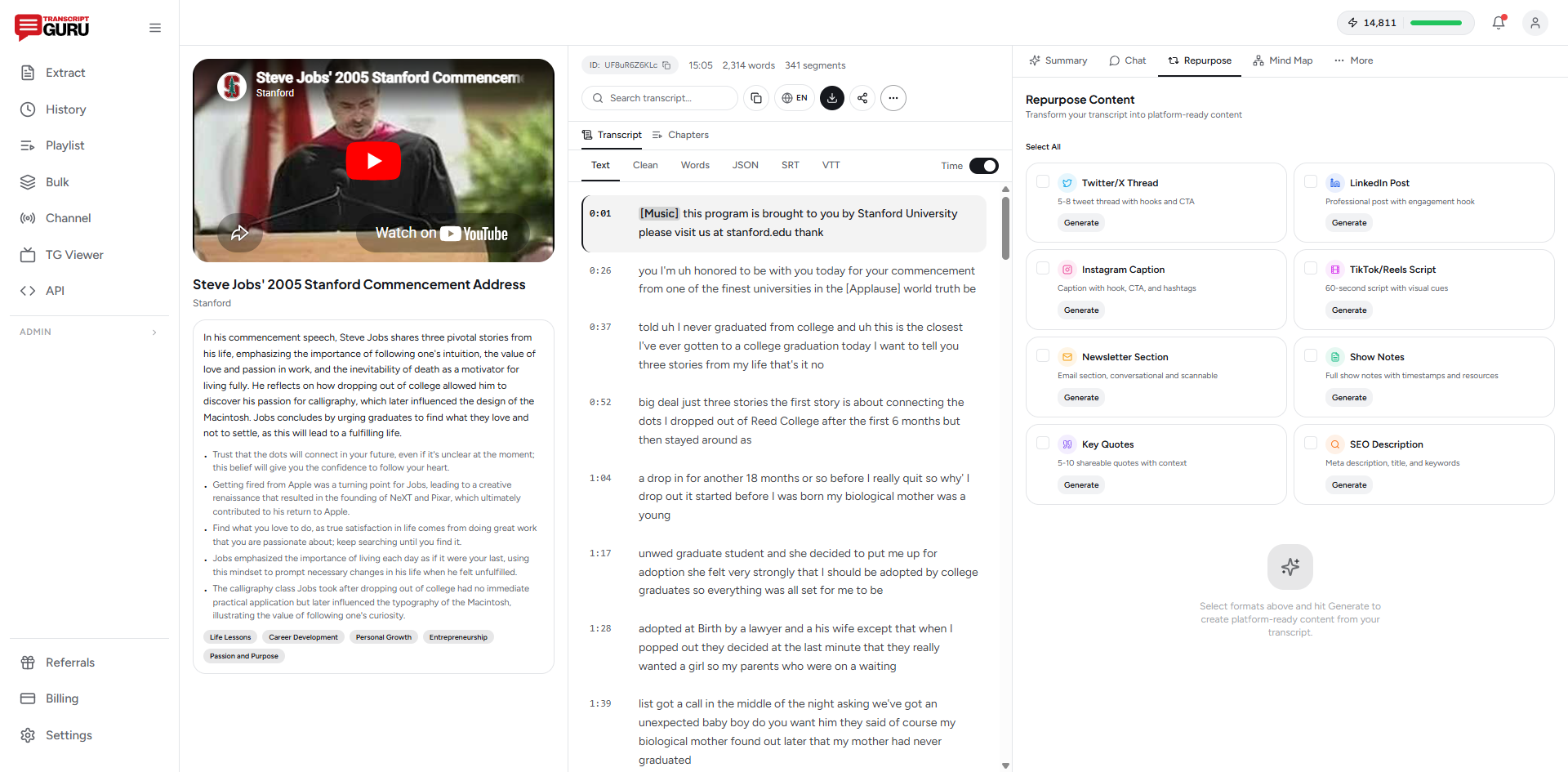
Generate show notes from your podcast in minutes
Get Started FreeStep 3: Edit and publish
This is the part humans are actually good at. Review the generated show notes and:
- Fix any names or terms the AI got wrong
- Add links that weren't in the transcript (your AI tool can't know your guest's handle)
- Adjust timestamps if they're off
- Add your standard CTA (subscribe, review, sponsor message)
- Match the tone to your brand
Total time for the full process: 5-10 minutes. That's a fraction of the manual approach.
Why Show Notes Matter More Than You Think
"Nobody reads show notes" is something you hear a lot in podcasting circles. It's wrong.
Search engines read them. A show-notes page on your website is text that Google can crawl, understand, and rank. Your show notes are how search engines understand what your episode is about. No show notes, no search traffic.
Podcast apps use them for discovery. Apple Podcasts and Spotify both use episode descriptions for search within their apps. If someone searches "how to start a newsletter" and your episode covers that topic, they'll only find it if your show notes contain those keywords.
Listeners use timestamps. Not everyone has time for a full episode. Timestamps let busy people jump to the section they care about. This increases plays and completion rates.
They drive traffic to your website. Show notes on your website create SEO-friendly pages that bring in listeners who never would have found your podcast through audio-only platforms.
Show Notes as Content Marketing
Here's something most podcasters miss: show notes aren't just a podcast chore. They're content marketing.
If you publish your show notes on your website (not just in the podcast app), each episode becomes a blog post. With a few tweaks, like adding headers, expanding key points, and linking to related episodes, your show notes page can rank on Google and drive organic traffic. We cover the full version of this in how to turn a podcast episode into a blog post.
Some podcasters build their entire content strategy around this. Record once, publish the audio as a podcast, publish the show notes as a blog post, pull quotes for social media. One recording, three distribution channels.
Templates and Formats
If you want to standardize your show notes (which you should, consistency builds trust), here's a template that works well:
Episode Title: [Title]
Guest: [Name], [One-line bio]

Summary:
[2-3 paragraphs about what this episode covers]

Topics & Timestamps:
[00:00] Introduction
[02:15] [Topic 1]
[08:30] [Topic 2]
[15:45] [Topic 3]
...

Key Takeaways:
- [Takeaway 1]
- [Takeaway 2]
- [Takeaway 3]

Links & Resources:
- [Link 1]
- [Link 2]

Connect with [Guest Name]:
- Social: [handle]
- Website: [url]

Subscribe & leave a review on [Platform].
Once you have this template, generating show notes becomes a fill-in-the-blanks exercise. AI tools can fill most of it automatically from the transcript.
Workflow for Different Podcast Types
Solo episodes
These are the easiest. One speaker, usually more structured. The transcript maps almost directly to show notes. AI tools handle these with very high accuracy.
Interview episodes
These need speaker labels in the transcript to work well. Tools like Otter.ai and Descript handle speaker detection. The show notes should highlight both the guest's insights and the questions that led to them.
Panel discussions / roundtables
These are the hardest to generate show notes for because there are multiple speakers and the conversation jumps around. You'll need more manual editing here. Focus on the topics discussed rather than trying to attribute every point to a specific panelist.
Getting Started Today
Here's what to do right now:
- Pick your most recent episode
- Get the transcript (upload the audio to any transcription tool, or if it's on YouTube, paste the URL into a tool like Transcript Guru)
- Generate show notes using AI or write them from the transcript
- Publish them in your podcast description and on your website
- Compare the time it took versus your old process
Once you see how much faster this is, you'll never go back to writing show notes from memory. The transcript changes everything.
Want to try the automated version? Transcript Guru generates show notes directly from YouTube podcast URLs. Transcript extraction is free and unlimited, and the free plan includes 20 AI credits per month for the generation step.
Keep reading
- How to Turn a Podcast Episode Into a Blog Post
- How to Repurpose YouTube Videos Into Social Media Content
- How to Summarize a YouTube Video With AI
Frequently Asked Questions
How long should podcast show notes be?
Aim for 150 to 400 words plus a timestamped topic list. That is enough to summarize the episode, surface keywords for search, and give listeners a reason to click, without turning into a full transcript dump.
Do show notes actually help discovery?
Yes. Podcast apps index your episode description for in-app search, and a show-notes page on your own site creates a text page that search engines can rank. Audio alone is hard to surface; the text around it is what gets found.
What is the fastest way to generate show notes?
Start from the transcript. Working with searchable text is far faster than re-listening to audio. If your show is on YouTube, you can pull the transcript for free and generate structured show notes directly from it in a couple of minutes.
Can AI write show notes accurately?
AI gets you a strong 80 percent draft: summary, topics, timestamps, and mentioned resources. You still review for names, add links the transcript cannot know (like a guest's handle), and match your brand voice. Budget about five minutes of editing.
Ready to try it yourself?
Extract transcripts, generate summaries, and repurpose content, free to start.
Start FreeRelated Articles
How to Turn a Podcast Episode Into a Blog Post
Mar 13, 2026
TranscriptionHow to Transcribe a YouTube Video to Text (Free, No Software)
Jun 1, 2026
Summaries & AIHow to Summarize a YouTube Video With AI (Without Watching It)
May 28, 2026
TranslationHow to Translate YouTube Subtitles Into Any Language
May 24, 2026