'%20d='M35.1527%2028.5549L35.1527%2069L17.6979%2069L17.6979%2028.5549L-0.162012%2028.5549L-0.162012%2014.6489L52.9354%2014.6489L52.9354%2028.5549L35.1527%2028.5549ZM108.55%2031.313Q108.55%2036.2891%20105.85%2040.3201Q103.169%2044.3511%2098.0385%2046.2412L110.132%2069L90.5358%2069L80.8923%2049.1729L74.4118%2049.1729L74.4118%2069L56.957%2069L56.957%2014.6489L90.2272%2014.6489Q96.0712%2014.6489%20100.218%2016.9055Q104.365%2019.1428%20106.448%2022.981Q108.55%2026.8191%20108.55%2031.313ZM90.7673%2032.0266Q90.7673%2029.8857%2089.34%2028.4778Q87.9321%2027.0505%2085.8684%2027.0505L74.4118%2027.0505L74.4118%2037.0798L85.8684%2037.0798Q87.9321%2037.0798%2089.34%2035.6333Q90.7673%2034.1675%2090.7673%2032.0266ZM150.883%2069L148.607%2061.343L129.551%2061.343L127.276%2069L109.416%2069L129.243%2014.6489L149.552%2014.6489L169.379%2069L150.883%2069ZM133.197%2049.1729L144.962%2049.1729L139.272%2029.8086L138.964%2029.8086L133.197%2049.1729ZM210.844%2069L188.028%2042.6152L188.028%2069L171.981%2069L171.981%2014.6489L187.237%2014.6489L210.054%2041.4194L210.054%2014.6489L226.101%2014.6489L226.101%2069L210.844%2069ZM256.674%2013.7039Q267.108%2013.7039%20273.82%2017.9277Q280.532%2022.1516%20280.686%2030.4451L280.686%2031.3901L264.331%2031.3901L264.331%2031.0815Q264.331%2028.7092%20262.595%2027.1277Q260.859%2025.5461%20257.31%2025.5461Q253.819%2025.5461%20251.968%2026.5876Q250.116%2027.6099%20250.116%2029.1143Q250.116%2031.2358%20252.643%2032.2773Q255.169%2033.2996%20260.782%2034.3989Q267.34%2035.749%20271.564%2037.2148Q275.787%2038.6614%20278.951%2041.9788Q282.114%2045.2961%20282.191%2050.9858Q282.191%2060.6294%20275.672%2065.2969Q269.153%2069.9451%20258.255%2069.9451Q245.526%2069.9451%20238.448%2065.6826Q231.388%2061.4202%20231.388%2050.6001L247.898%2050.6001Q247.898%2054.7083%20250.02%2056.0969Q252.161%2057.4663%20256.674%2057.4663Q259.991%2057.4663%20262.151%2056.7527Q264.331%2056.0391%20264.331%2053.8403Q264.331%2051.8538%20261.92%2050.8701Q259.509%2049.8865%20254.07%2048.7678Q247.435%2047.3599%20243.076%2045.8169Q238.737%2044.2739%20235.497%2040.7251Q232.256%2037.157%20232.256%2031.0815Q232.256%2022.1516%20239.161%2017.9277Q246.085%2013.7039%20256.674%2013.7039ZM312.848%2013.7039Q324.922%2013.7039%20331.942%2019.7407Q338.982%2025.7776%20338.982%2037.0027L322.318%2037.0027Q322.318%2032.2581%20319.83%2029.5Q317.342%2026.7419%20312.751%2026.7419Q307.467%2026.7419%20304.979%2030.0593Q302.491%2033.3767%20302.491%2039.2979L302.491%2044.3511Q302.491%2050.1951%20304.979%2053.551Q307.467%2056.907%20312.597%2056.907Q317.65%2056.907%20320.254%2054.3032Q322.877%2051.6995%20322.877%2046.9548L338.982%2046.9548Q338.982%2058.1028%20332.154%2064.0239Q325.327%2069.9451%20312.848%2069.9451Q298.942%2069.9451%20291.786%2062.8474Q284.631%2055.7305%20284.631%2041.8245Q284.631%2027.9185%20291.786%2020.8208Q298.942%2013.7039%20312.848%2013.7039ZM396.031%2031.313Q396.031%2036.2891%20393.331%2040.3201Q390.65%2044.3511%20385.519%2046.2412L397.612%2069L378.017%2069L368.373%2049.1729L361.893%2049.1729L361.893%2069L344.438%2069L344.438%2014.6489L377.708%2014.6489Q383.552%2014.6489%20387.699%2016.9055Q391.846%2019.1428%20393.929%2022.981Q396.031%2026.8191%20396.031%2031.313ZM378.248%2032.0266Q378.248%2029.8857%20376.821%2028.4778Q375.413%2027.0505%20373.349%2027.0505L361.893%2027.0505L361.893%2037.0798L373.349%2037.0798Q375.413%2037.0798%20376.821%2035.6333Q378.248%2034.1675%20378.248%2032.0266ZM402.741%2069L402.741%2014.6489L420.195%2014.6489L420.195%2069L402.741%2069ZM459.224%2014.6489Q464.277%2014.6489%20468.231%2016.9827Q472.185%2019.3164%20474.383%2023.386Q476.602%2027.4556%20476.602%2032.5088L476.602%2033.531Q476.602%2038.5842%20474.383%2042.6924Q472.185%2046.8005%20468.231%2049.1343Q464.277%2051.468%20459.224%2051.468L446.186%2051.468L446.186%2069L428.731%2069L428.731%2014.6489L459.224%2014.6489ZM446.186%2038.7385L453.38%2038.7385Q456.138%2038.7385%20457.527%2037.3306Q458.915%2035.9033%20458.915%2033.4539L458.915%2032.8174Q458.915%2030.2908%20457.527%2028.9214Q456.138%2027.5327%20453.38%2027.5327L446.186%2027.5327L446.186%2038.7385ZM513.103%2028.5549L513.103%2069L495.648%2069L495.648%2028.5549L477.788%2028.5549L477.788%2014.6489L530.885%2014.6489L530.885%2028.5549L513.103%2028.5549Z'/%3e%3c/svg%3e)

You know that feeling when you finish uploading a YouTube video and immediately start dreading the social media promotion? You just spent hours filming, editing, and rendering. Now you're supposed to write a Twitter thread, a LinkedIn post, an Instagram caption, and maybe a blog draft too?
Most creators either skip this step entirely (leaving a ton of reach on the table) or spend another hour writing posts from memory. Neither option is great.
The fix is simpler than you think: start with the transcript. Your video already contains everything you need. The insights, the stories, the practical advice, it's all there in spoken form. You just need to extract it and reshape it for different platforms.
This guide walks through the full process, from grabbing the transcript to having ready-to-post content for every major platform. Whether you do it manually or use tools to speed things up, you'll walk away with a repeatable system.
Why Most Creators Underutilize Their Videos
Here's a pattern worth noticing: a YouTube video can take five to ten hours to produce, and yet most creators promote it with a single tweet and a link. One tweet for a full day of work.
The problem isn't laziness. It's that creating platform-specific content feels like starting from zero each time. You're staring at a blank text box trying to remember what you said in minute 14 of a 25-minute video. Nobody enjoys that.
But think about it this way: a 15-minute YouTube video contains roughly 2,000-2,500 words of spoken content. That's enough raw material for:
- 3-5 Twitter/X threads
- 2-3 LinkedIn posts
- 4-6 Instagram carousel slides
- 1 full blog draft
- 1 newsletter section
- 5-10 standalone quotes for graphics
All from a single video. The content already exists, you just need to unlock it.
The Manual Approach (And Why It's Still Valid)
Before we get to tools, let's cover the manual method. It works. It's just slow.
Step 1: Get the transcript
YouTube auto-generates captions for most videos. You can access them by clicking the three dots below a video and selecting "Show transcript." Copy and paste it into a doc.
The quality varies. Auto-generated captions miss words, bungle names, and ignore punctuation. If you uploaded your own captions or SRT file, those will be cleaner. (For a full walkthrough of the options, see our guide on how to transcribe a YouTube video to text.)
Or use Transcript Guru to extract a clean, timestamped transcript instantly, then use the Repurpose tab to generate platform-ready content in one click.
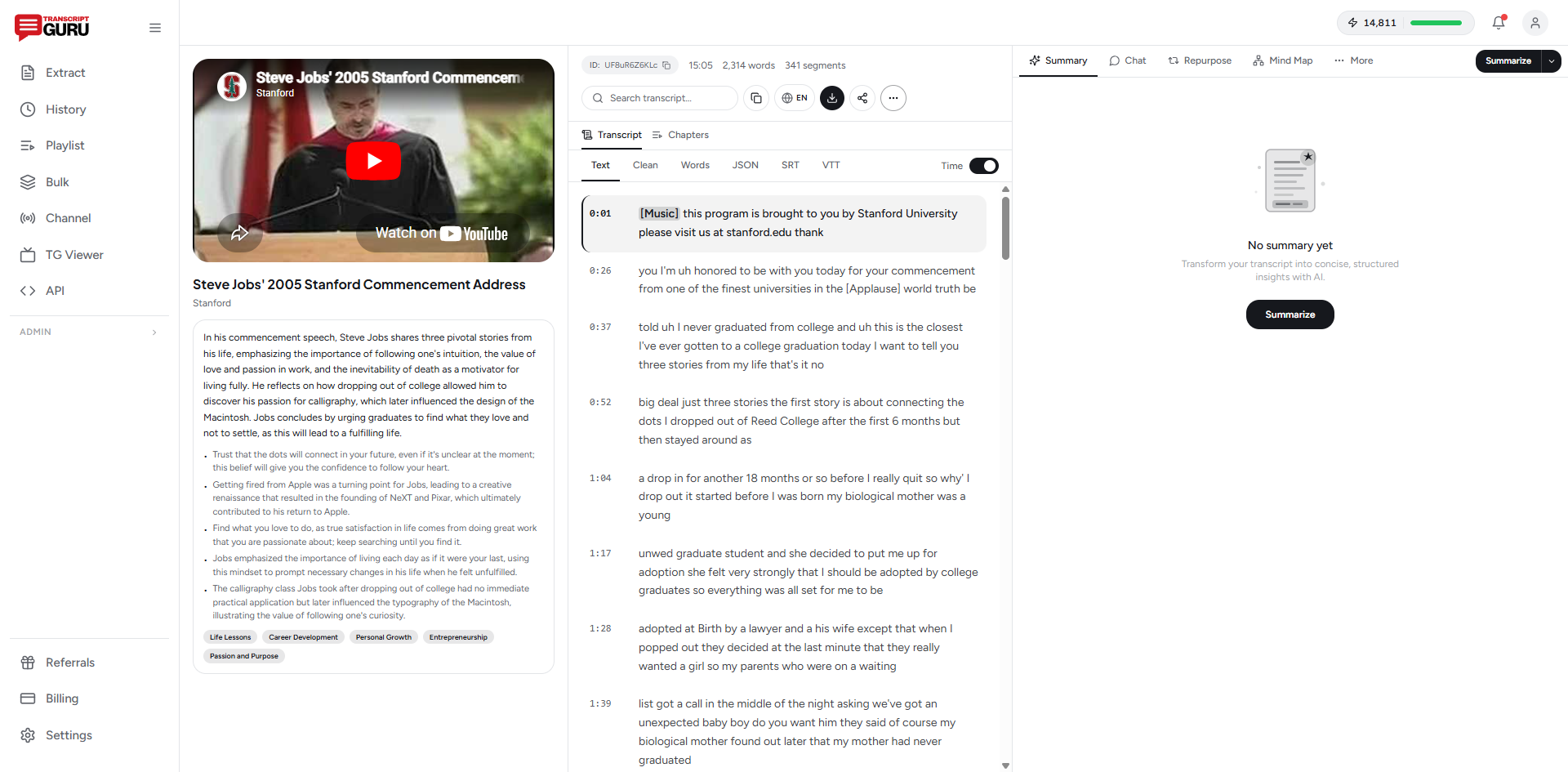
Step 2: Read through and highlight
Go through the transcript and mark the sections that stand out. Look for:
- Strong opinions - anything you said with conviction
- Practical advice - specific steps someone can follow
- Surprising stats or facts - the stuff that makes people stop scrolling
- Stories and anecdotes - these work especially well on LinkedIn and Instagram
- Quotable one-liners - short, punchy statements
Step 3: Rewrite for each platform
This is where the time goes. A Twitter thread needs to be broken into sub-280-character tweets with hooks and transitions. A LinkedIn post needs a strong opening line (the "see more" click), a story arc, and a call to engage. Instagram captions need personality and hashtags.
You're not just copying the transcript. You're reformatting, tightening, and adapting the tone. For one video, this can take 45 minutes to an hour if you're writing for 3-4 platforms.
The Automated Approach: Transcript-First Repurposing
This is where tools come in. The basic workflow looks like this:
- Paste your YouTube URL into a transcription tool
- Get a clean, formatted transcript
- Feed the transcript into AI to generate platform-specific content
- Review, tweak, and post
Several tools handle different parts of this pipeline. Here's how they stack up:
Transcription tools
YouTube's built-in captions - Free, but messy. No punctuation, frequent errors with technical terms and proper nouns. Good enough for a rough draft.
Otter.ai - Solid transcription with speaker labels. Works well for interviews and podcasts. The free tier has monthly limits.
Descript - Transcription plus a full editing suite. Great if you're also editing your video, overkill if you just need text.
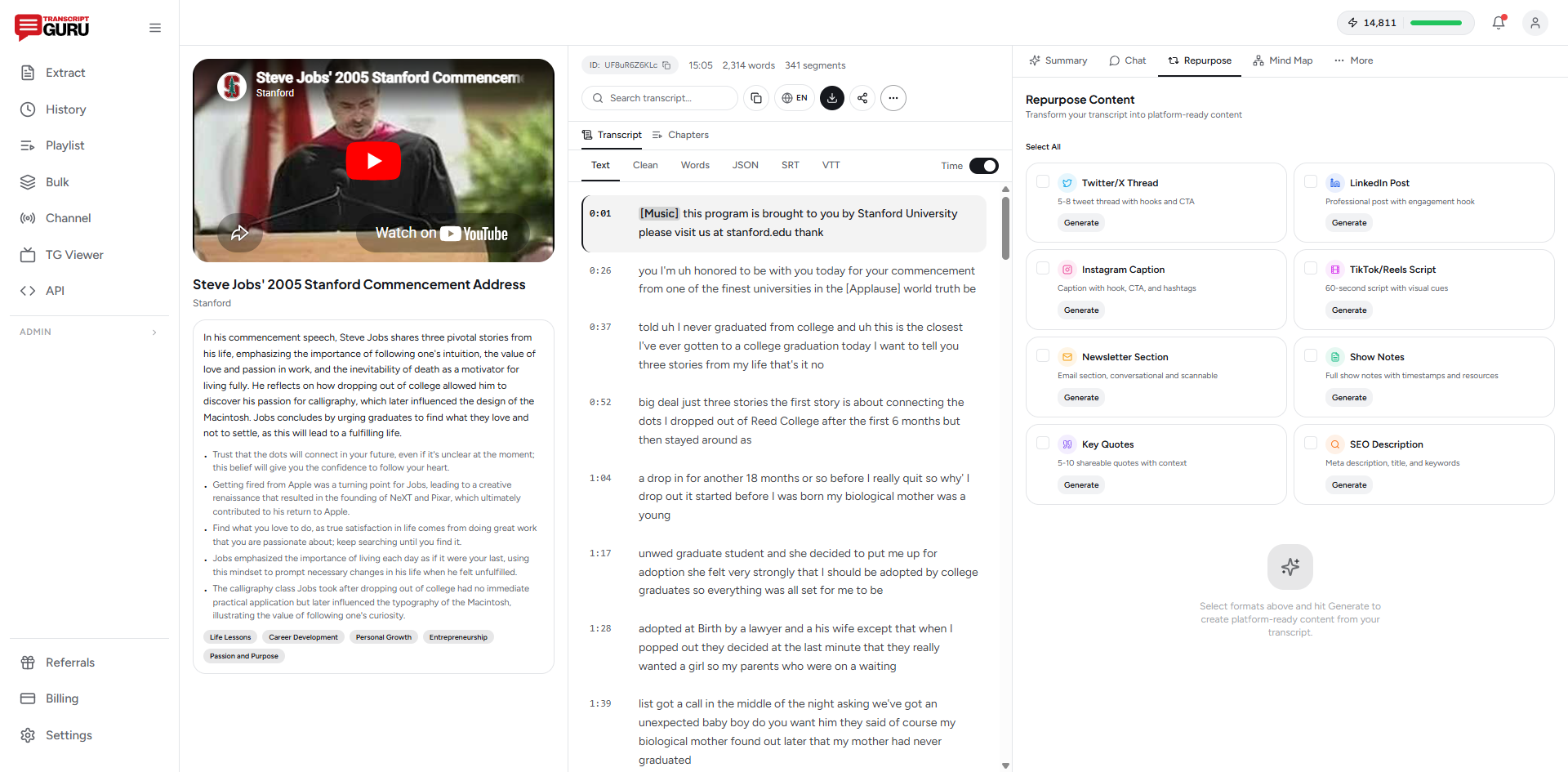
Transcript Guru - Built specifically for YouTube. Paste a URL, get a transcript in seconds. The thing that sets it apart is the one-click content repurposing: it generates Twitter threads, LinkedIn posts, blog drafts, show notes, and more directly from the transcript. No copy-pasting into ChatGPT required.
Turn any YouTube video into a week of social content
Get Started FreeAI writing tools
If your transcription tool doesn't handle repurposing, you can paste the transcript into:
- ChatGPT / Claude - Paste the transcript and ask for specific formats. Works well but requires good prompts and manual iteration.
- Typefully - Specifically for Twitter threads. Has AI features for drafting and scheduling.
- Repurpose.io - Automates distribution of video clips across platforms. More focused on video snippets than text repurposing.
Platform-by-Platform Breakdown
Not all content works everywhere. Here's what to extract for each platform:
Twitter / X
Best format: Threads (5-12 tweets). Single tweets with a link get buried. Threads get engagement because they keep people on-platform.
What to extract: Your main argument or framework, broken into digestible chunks. Each tweet should stand alone but flow into the next. Start with a hook, something surprising or contrarian. End with a recap or CTA. (We have a dedicated guide on turning a video into a Twitter thread.)
Pro tip: Don't include the YouTube link in the first tweet. Twitter's algorithm deprioritizes tweets with external links. Put it in a reply or the last tweet of the thread.
Best format: Long-form text posts (1,200-1,500 characters). Carousels also work well.
What to extract: A story or lesson from your video. LinkedIn rewards personal narratives and professional insights. Take one idea from your video and expand on it with context about why it matters to your audience.
Pro tip: The first line matters more than anything else. It determines whether people click "see more." Make it a bold statement or a question.
Best format: Carousel posts (swipeable slides with text) or Reels with caption text overlays.
What to extract: Step-by-step processes, tips lists, or key takeaways work great as carousels. Pull 5-8 short points from your video and turn each into a slide.
Blog / Newsletter
Best format: Long-form articles (800-2,000 words).
What to extract: The full argument of your video, cleaned up and restructured for reading. Add headers, fix the rambling parts, include links to sources. A transcript is already 80% of a blog post, it just needs editing.
A Real Workflow: One Video, Five Platforms, Under 15 Minutes
Here's what this actually looks like using the automated approach:
- Paste the YouTube URL into Transcript Guru (or your preferred transcription tool). The transcript is ready in about 20 seconds.
- Click "Repurpose" and select your formats: Twitter thread, LinkedIn post, blog draft, show notes, key quotes.
- Review the outputs. Each one is formatted for its platform. The Twitter thread has individual tweets under 280 characters. The LinkedIn post has a hook and story structure. The blog draft has headers and paragraphs.
- Edit what needs editing. Maybe the hook on the LinkedIn post is too generic. Maybe one of the tweets needs a stronger punchline. This takes 5-10 minutes.
- Copy, paste, schedule, post. Done.
Total time from YouTube upload to having content ready for five platforms: about 12-15 minutes. Compare that to an hour or more of manual writing.
Common Mistakes When Repurposing
A few things that trip people up:
Copying the transcript verbatim. Spoken language reads terribly. "So, um, the thing about this is, like, you really need to think about..." Nobody wants to read that. Always clean it up, even if you're using AI tools.
Using the same content everywhere. A tweet is not a LinkedIn post is not an Instagram caption. Each platform has its own culture, format, and audience expectations. Repurposing doesn't mean cross-posting the same text.
Skipping the editing step. AI-generated content is a first draft, not a final draft. It needs your voice, your specific examples, your personality. Spend 5 minutes making it sound like you.
Posting everything at once. You made one video, but you generated 10+ pieces of content. Spread them out. Post the Twitter thread on day one, the LinkedIn post on day two, the carousel on day three. This extends the life of your video and keeps your feed active.
Batch Processing for Serious Creators
If you publish weekly videos, you can batch the repurposing. Once a month, take your last four videos and run them all through the pipeline in one sitting. Tools like Transcript Guru support bulk extraction from playlists, so you can process multiple videos at once.
You'll end up with a content bank: a folder full of ready-to-post content for the next month. Schedule it using Buffer, Typefully, or your preferred scheduler, and you're set.
This is how creators go from "I need to promote this video" to having a genuine content system that runs on autopilot.
Does Repurposed Content Actually Perform?
Short answer: yes, often better than original social content. And it makes sense when you think about it.
Your YouTube video was probably well-thought-out. You researched it, structured it, and delivered it in a way that made sense. When you repurpose that into a Twitter thread, you're not starting with a half-baked idea, you're starting with refined thinking that's already been tested on an audience.
Plenty of creators report that their repurposed threads and posts outperform their "native" social content. The reason is simple: the source material is stronger.
Getting Started
You don't need to do all of this at once. Start small:
- Pick your most recent YouTube video
- Get the transcript (manually from YouTube or using a tool)
- Write one Twitter thread from it
- See how it performs compared to your usual tweets
Once you see the results, you'll want to do this for every video. And at that point, the automation tools start making a lot of sense, not because you can't do it manually, but because you shouldn't have to.
If you want to try the automated route, Transcript Guru lets you paste a YouTube URL and generate repurposed content in multiple formats with one click. YouTube transcript extraction is free and unlimited, and the free plan adds 20 AI credits per month, enough to repurpose several videos end to end.
Keep reading
- Turn Any YouTube Video Into a Twitter Thread in 30 Seconds
- How to Summarize a YouTube Video With AI
- How to Generate Show Notes From a Podcast Automatically
- How to Turn a Podcast Episode Into a Blog Post
Frequently Asked Questions
Can I repurpose a YouTube video without the original transcript?
Yes. You do not need to write anything down first. Paste the video URL into a transcript tool to pull the full spoken text, then reshape that text into posts. On Transcript Guru, YouTube caption extraction is free and unlimited, so getting the raw material costs nothing.
How many social posts can one video produce?
A 15-minute video holds roughly 2,000 to 2,500 spoken words, which is enough for several Twitter threads, two or three LinkedIn posts, an Instagram carousel, a blog draft, and a handful of quote graphics. One upload can fuel a week or more of content.
Is repurposed content bad for SEO or reach?
No, as long as you adapt it per platform instead of pasting identical text everywhere. Each network has its own format and audience, so reformatting the same idea is expected and rewarded. Cross-posting the exact same block of text is what underperforms.
Do I need a paid plan to repurpose videos?
Extracting the transcript is free. The AI that turns it into platform-ready posts uses credits, and the free plan includes 20 credits per month, enough to repurpose several videos end to end. Paid plans add more monthly credits for higher volume.
Ready to try it yourself?
Extract transcripts, generate summaries, and repurpose content, free to start.
Start FreeRelated Articles
Turn Any YouTube Video Into a Twitter Thread in 30 Seconds
Mar 19, 2026
TranscriptionHow to Transcribe a YouTube Video to Text (Free, No Software)
Jun 1, 2026
Summaries & AIHow to Summarize a YouTube Video With AI (Without Watching It)
May 28, 2026
TranslationHow to Translate YouTube Subtitles Into Any Language
May 24, 2026