'%20d='M35.1527%2028.5549L35.1527%2069L17.6979%2069L17.6979%2028.5549L-0.162012%2028.5549L-0.162012%2014.6489L52.9354%2014.6489L52.9354%2028.5549L35.1527%2028.5549ZM108.55%2031.313Q108.55%2036.2891%20105.85%2040.3201Q103.169%2044.3511%2098.0385%2046.2412L110.132%2069L90.5358%2069L80.8923%2049.1729L74.4118%2049.1729L74.4118%2069L56.957%2069L56.957%2014.6489L90.2272%2014.6489Q96.0712%2014.6489%20100.218%2016.9055Q104.365%2019.1428%20106.448%2022.981Q108.55%2026.8191%20108.55%2031.313ZM90.7673%2032.0266Q90.7673%2029.8857%2089.34%2028.4778Q87.9321%2027.0505%2085.8684%2027.0505L74.4118%2027.0505L74.4118%2037.0798L85.8684%2037.0798Q87.9321%2037.0798%2089.34%2035.6333Q90.7673%2034.1675%2090.7673%2032.0266ZM150.883%2069L148.607%2061.343L129.551%2061.343L127.276%2069L109.416%2069L129.243%2014.6489L149.552%2014.6489L169.379%2069L150.883%2069ZM133.197%2049.1729L144.962%2049.1729L139.272%2029.8086L138.964%2029.8086L133.197%2049.1729ZM210.844%2069L188.028%2042.6152L188.028%2069L171.981%2069L171.981%2014.6489L187.237%2014.6489L210.054%2041.4194L210.054%2014.6489L226.101%2014.6489L226.101%2069L210.844%2069ZM256.674%2013.7039Q267.108%2013.7039%20273.82%2017.9277Q280.532%2022.1516%20280.686%2030.4451L280.686%2031.3901L264.331%2031.3901L264.331%2031.0815Q264.331%2028.7092%20262.595%2027.1277Q260.859%2025.5461%20257.31%2025.5461Q253.819%2025.5461%20251.968%2026.5876Q250.116%2027.6099%20250.116%2029.1143Q250.116%2031.2358%20252.643%2032.2773Q255.169%2033.2996%20260.782%2034.3989Q267.34%2035.749%20271.564%2037.2148Q275.787%2038.6614%20278.951%2041.9788Q282.114%2045.2961%20282.191%2050.9858Q282.191%2060.6294%20275.672%2065.2969Q269.153%2069.9451%20258.255%2069.9451Q245.526%2069.9451%20238.448%2065.6826Q231.388%2061.4202%20231.388%2050.6001L247.898%2050.6001Q247.898%2054.7083%20250.02%2056.0969Q252.161%2057.4663%20256.674%2057.4663Q259.991%2057.4663%20262.151%2056.7527Q264.331%2056.0391%20264.331%2053.8403Q264.331%2051.8538%20261.92%2050.8701Q259.509%2049.8865%20254.07%2048.7678Q247.435%2047.3599%20243.076%2045.8169Q238.737%2044.2739%20235.497%2040.7251Q232.256%2037.157%20232.256%2031.0815Q232.256%2022.1516%20239.161%2017.9277Q246.085%2013.7039%20256.674%2013.7039ZM312.848%2013.7039Q324.922%2013.7039%20331.942%2019.7407Q338.982%2025.7776%20338.982%2037.0027L322.318%2037.0027Q322.318%2032.2581%20319.83%2029.5Q317.342%2026.7419%20312.751%2026.7419Q307.467%2026.7419%20304.979%2030.0593Q302.491%2033.3767%20302.491%2039.2979L302.491%2044.3511Q302.491%2050.1951%20304.979%2053.551Q307.467%2056.907%20312.597%2056.907Q317.65%2056.907%20320.254%2054.3032Q322.877%2051.6995%20322.877%2046.9548L338.982%2046.9548Q338.982%2058.1028%20332.154%2064.0239Q325.327%2069.9451%20312.848%2069.9451Q298.942%2069.9451%20291.786%2062.8474Q284.631%2055.7305%20284.631%2041.8245Q284.631%2027.9185%20291.786%2020.8208Q298.942%2013.7039%20312.848%2013.7039ZM396.031%2031.313Q396.031%2036.2891%20393.331%2040.3201Q390.65%2044.3511%20385.519%2046.2412L397.612%2069L378.017%2069L368.373%2049.1729L361.893%2049.1729L361.893%2069L344.438%2069L344.438%2014.6489L377.708%2014.6489Q383.552%2014.6489%20387.699%2016.9055Q391.846%2019.1428%20393.929%2022.981Q396.031%2026.8191%20396.031%2031.313ZM378.248%2032.0266Q378.248%2029.8857%20376.821%2028.4778Q375.413%2027.0505%20373.349%2027.0505L361.893%2027.0505L361.893%2037.0798L373.349%2037.0798Q375.413%2037.0798%20376.821%2035.6333Q378.248%2034.1675%20378.248%2032.0266ZM402.741%2069L402.741%2014.6489L420.195%2014.6489L420.195%2069L402.741%2069ZM459.224%2014.6489Q464.277%2014.6489%20468.231%2016.9827Q472.185%2019.3164%20474.383%2023.386Q476.602%2027.4556%20476.602%2032.5088L476.602%2033.531Q476.602%2038.5842%20474.383%2042.6924Q472.185%2046.8005%20468.231%2049.1343Q464.277%2051.468%20459.224%2051.468L446.186%2051.468L446.186%2069L428.731%2069L428.731%2014.6489L459.224%2014.6489ZM446.186%2038.7385L453.38%2038.7385Q456.138%2038.7385%20457.527%2037.3306Q458.915%2035.9033%20458.915%2033.4539L458.915%2032.8174Q458.915%2030.2908%20457.527%2028.9214Q456.138%2027.5327%20453.38%2027.5327L446.186%2027.5327L446.186%2038.7385ZM513.103%2028.5549L513.103%2069L495.648%2069L495.648%2028.5549L477.788%2028.5549L477.788%2014.6489L530.885%2014.6489L530.885%2028.5549L513.103%2028.5549Z'/%3e%3c/svg%3e)

There's an enormous amount of teaching on YouTube: full university lectures, exam crash courses, coding tutorials, language lessons, documentaries. The problem isn't finding good material. It's that video is a terrible format for studying. You can't skim it, search it, or quiz yourself on it. You just sit there and re-watch, hoping it sticks.
The fix is to convert the video into text and study from that instead. A transcript turns a passive 90-minute lecture into something you can treat like a textbook chapter: searchable, skimmable, and ready to become notes, flashcards, and a study guide. Here's the full workflow.
Why Studying From a Transcript Works Better
This isn't just convenience, it lines up with how learning actually works:
- You can skim and search. Jump straight to the concept you're stuck on instead of scrubbing the timeline.
- You read faster than people talk. Most people read several times faster than the average speaking pace, so reviewing text saves real time.
- It enables active recall. Text converts cleanly into flashcards and quizzes, and testing yourself beats re-watching for retention.
- It's annotatable. Highlight, add margin notes, and reorganize, things you can't do to a video.
Step 1: Get the Lecture Transcript
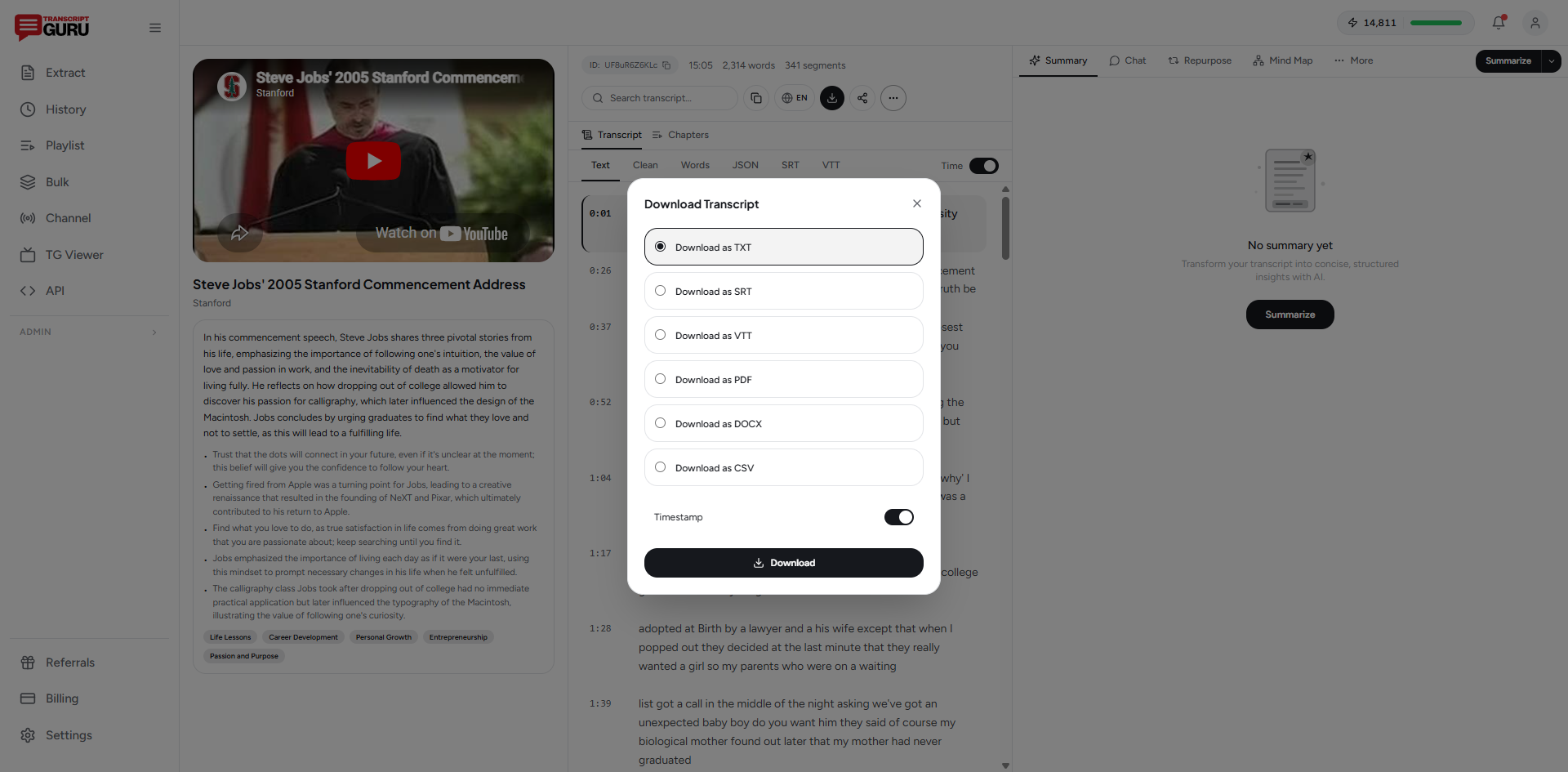
Start by pulling the text. Paste the video URL into a transcript tool and you'll have the full lecture as text in seconds, or use YouTube's built-in "Show transcript" panel for a quick grab. The full walkthrough is in how to transcribe a YouTube video to text.
For studying specifically, keep the timestamps. When a flashcard or note references something you want to hear explained again, a timestamp lets you jump straight back to that moment in the video.
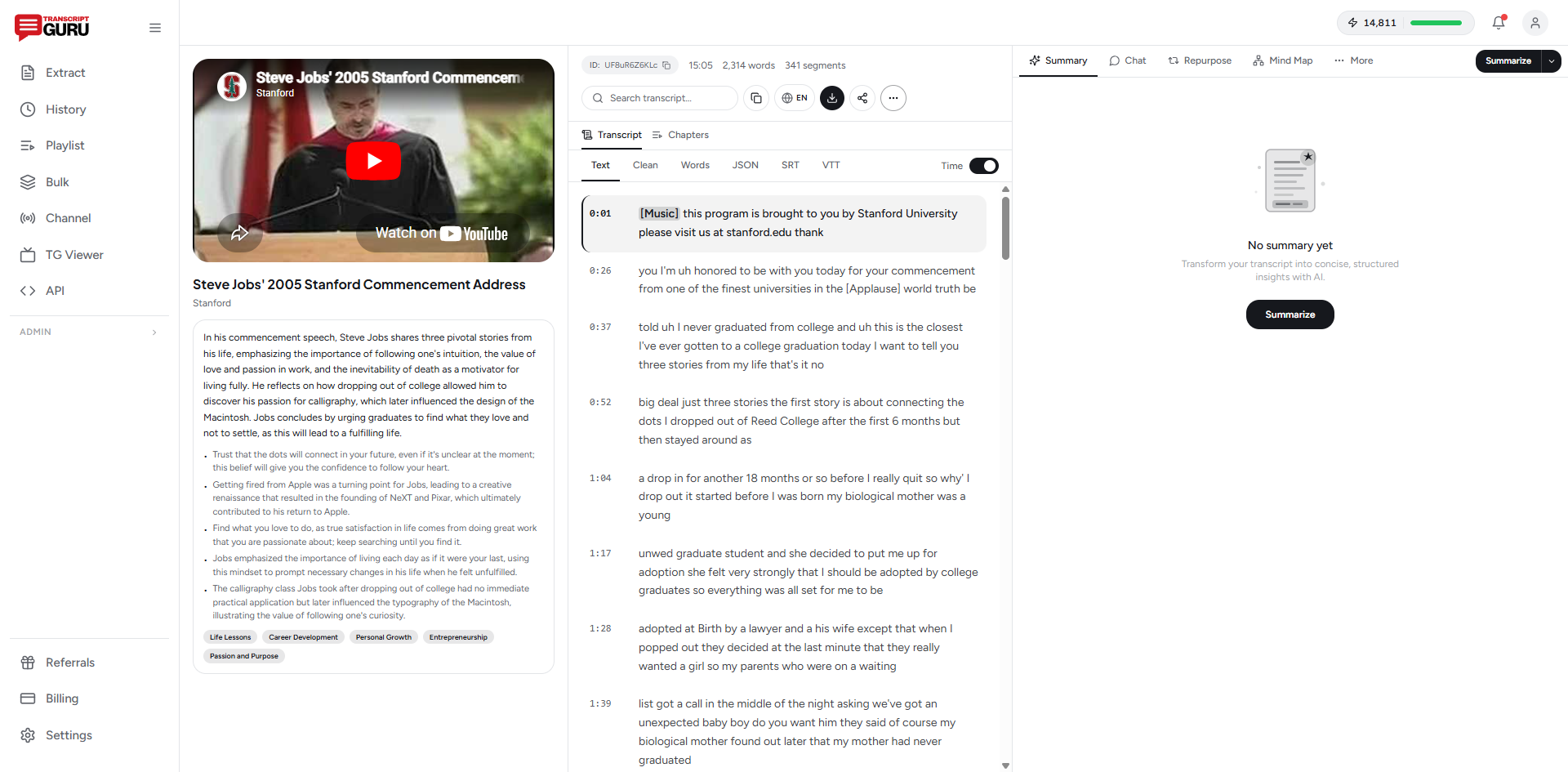
Step 2: Turn the Transcript Into Notes
A raw transcript isn't notes yet. To make it study-ready:
- Add structure. Insert headers for each topic the lecturer moves through.
- Pull key concepts. Extract definitions, formulas, dates, and names into a separate list.
- Condense. Cut the asides and repetition. Lecturers repeat themselves; your notes shouldn't.
- Add your own questions. Note anything you didn't understand to revisit later.
You can do this by hand, or have AI do the first pass. A "key concepts" or "summary" generation from the transcript gives you a structured starting point you then refine, which is much faster than building notes from a blank page.
Step 3: Generate Active-Recall Materials
This is where studying from a transcript pulls ahead of re-watching. From the same text you can generate the materials that actually drive retention:
- Summary. A quick overview to orient yourself before a deep review.
- Flashcards. Question-and-answer cards on the key terms and ideas, for active recall.
- Quiz. Practice questions to test understanding and surface weak spots.
- Study guide. A structured, exam-oriented breakdown of the whole topic.
- Mind map. A visual map of how the concepts connect, useful for seeing the big picture (available on the Pro plan).
On Transcript Guru, these run directly off the transcript. Extraction is free, and the AI study tools use credits, with a monthly allotment on every plan, so you can build a summary, flashcards, and a quiz from a lecture without paying.
Turn any lecture into notes and flashcards
Get Started FreeStep 4: Review With Spaced Repetition
Generating flashcards is only half the job; the gains come from how you review them. Two well-established techniques:
- Active recall. Try to answer before flipping the card. The effort of retrieval is what builds memory, not re-reading.
- Spaced repetition. Review cards at increasing intervals over days and weeks. Apps like Anki automate the scheduling; export your flashcards into one and let it handle the timing.
A lecture you transcribed once can feed weeks of short, efficient review sessions, far more effective than cramming by re-watching the night before.
Workflows for Different Study Material
University lectures
Transcribe the recording, generate a study guide and flashcards, and use the timestamps to jump back to anything the guide flags as important. Pair it with a quiz a few days before the exam.
Tutorials and how-tos
Pull the transcript so you can follow the steps at your own pace, copy commands or specifics exactly, and search for the one step you got stuck on without rewinding.
Language learning
Transcribe a video in the language you're learning, then translate it for comparison. Reading the original alongside a translation builds vocabulary in context. See how to translate YouTube subtitles.
One Caveat: Check the Accuracy
Auto-generated captions occasionally mishear technical terms, names, and numbers, which are exactly the things you don't want wrong in study notes. Spot-check key facts against the video, and lean on cleaner transcripts (creator-uploaded captions or AI transcription) for dense technical subjects where a single wrong term changes the meaning.
The Short Version
To study from a YouTube video: transcribe it, turn the transcript into structured notes, generate flashcards and a study guide, and review with active recall and spaced repetition. You'll cover the material faster and remember more than you would from another passive re-watch.
Start with Transcript Guru: free, unlimited transcript extraction, plus AI summaries, flashcards, quizzes, and study guides built from the same text.
Keep reading
- How to Transcribe a YouTube Video to Text
- How to Summarize a YouTube Video With AI
- How to Translate YouTube Subtitles Into Any Language
Frequently Asked Questions
How do I take notes from a YouTube video?
Get the transcript, then treat it like a textbook chapter: skim for structure, add your own headers, and pull key concepts and definitions into notes. Working from text is far faster than pausing and rewinding the video repeatedly.
Can I make flashcards from a YouTube video?
Yes. Once you have the transcript, AI can extract the key terms and turn them into question-and-answer flashcards. You can study them in the tool or export them into an app like Anki for spaced repetition.
Is this better than just watching the lecture again?
For review, usually yes. Re-watching is passive and slow. Studying from a transcript lets you search, skim, quiz yourself, and focus only on the parts you haven't mastered, which is far more efficient before an exam.
Does it work for any subject?
It works best for spoken, explanatory content: lectures, tutorials, documentaries, and talks. It's less useful for videos where the value is purely visual, like a silent diagram walkthrough, though the spoken narration still transcribes.
Do I need to pay to make study materials?
Transcript extraction is free. AI study tools like summaries, flashcards, quizzes, and study guides run on credits, and every plan includes a monthly allotment, so you can build study materials on the free plan. Mind maps are available on the Pro plan.
Ready to try it yourself?
Extract transcripts, generate summaries, and repurpose content, free to start.
Start FreeRelated Articles
How to Transcribe a YouTube Video to Text (Free, No Software)
Jun 1, 2026
Summaries & AIHow to Summarize a YouTube Video With AI (Without Watching It)
May 28, 2026
TranslationHow to Translate YouTube Subtitles Into Any Language
May 24, 2026
Content RepurposingHow to Repurpose YouTube Videos Into Social Media Content (2026 Guide)
Mar 25, 2026